-
Step 1: Practice details and safety replies
Open Clinic setup. Choose your practice size and set the emergency number (112 in India). Read the four safety replies: life-threatening emergency, urgent pain, "talk to a person" and medical questions. They are sent word for word - the assistant never gives treatment advice.
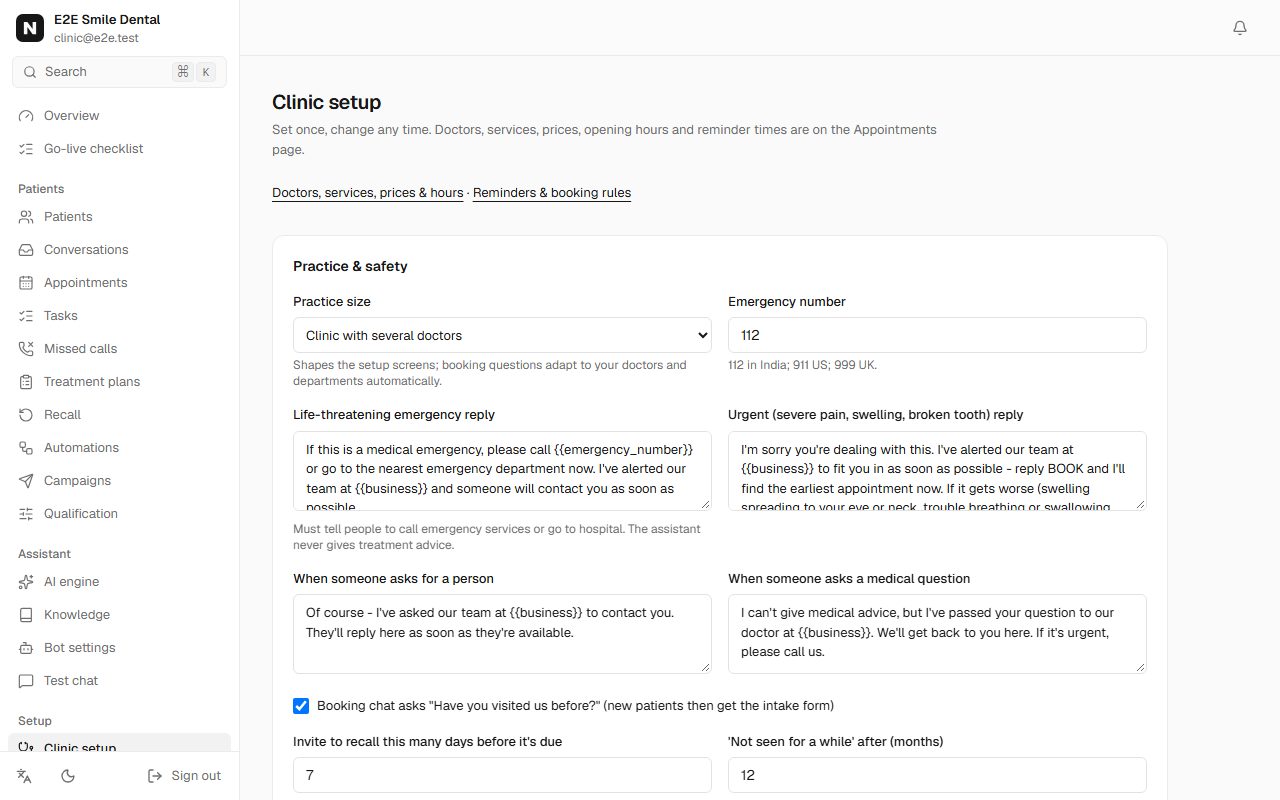
Clinic setup page with practice size, emergency number 112 and the emergency, urgent, person and medical-question replies What patients see (real replies)
- I have severe tooth pain and my cheek is swollen
- I'm sorry you're dealing with this. I've alerted our team at Smile Dental Studio to fit you in as soon as possible - reply BOOK and I'll find the earliest appointment now. If it gets worse (swelling spreading to your eye or neck, trouble breathing or swallowing, high fever, bleeding that won't stop), go to the nearest emergency department or call 112.
- Should I take amoxicillin for this?
- I can't give medical advice, but I've passed your question to our doctor at Smile Dental Studio. We'll get back to you here. If it's urgent, please call us.
What patients see (real replies): Customer: I have severe tooth pain and my cheek is swollen / Smile Dental Studio: I'm sorry you're dealing with this. I've alerted our team at Smile Dental Studio to fit you in as soon as possible - reply BOOK and I'll find the earliest appointment now. If it gets worse (swelling spreading to your eye or neck, trouble breathing or swallowing, high fever, bleeding that won't stop), go to the nearest emergency department or call 112. / Customer: Should I take amoxicillin for this? / Smile Dental Studio: I can't give medical advice, but I've passed your question to our doctor at Smile Dental Studio. We'll get back to you here. If it's urgent, please call us. -
-
Step 2: Doctors and their hours
In Appointments, Services & hours: add each doctor, hygienist or room under Resources, then their weekly hours under Availability. Multi-doctor clinics and hospitals can group doctors into departments; the booking chat then asks for the department first.
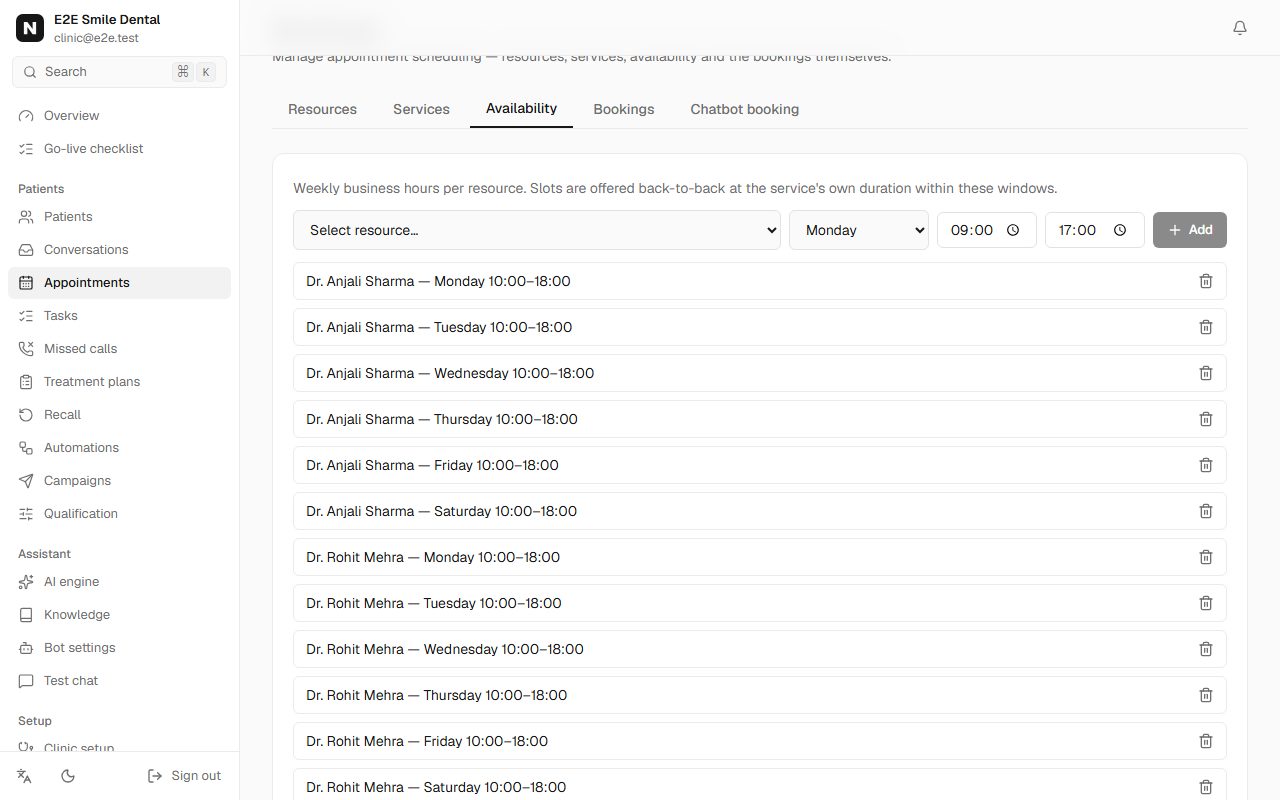
Weekly hours for each doctor, Monday to Saturday -
Step 3: Services, prices and recall intervals
Under Services add each treatment with its duration, which doctors do it, the price (the assistant may quote it) and an optional recall interval - for example check-up & cleaning every 6 months. Recall invitations are then sent automatically before patients are due.
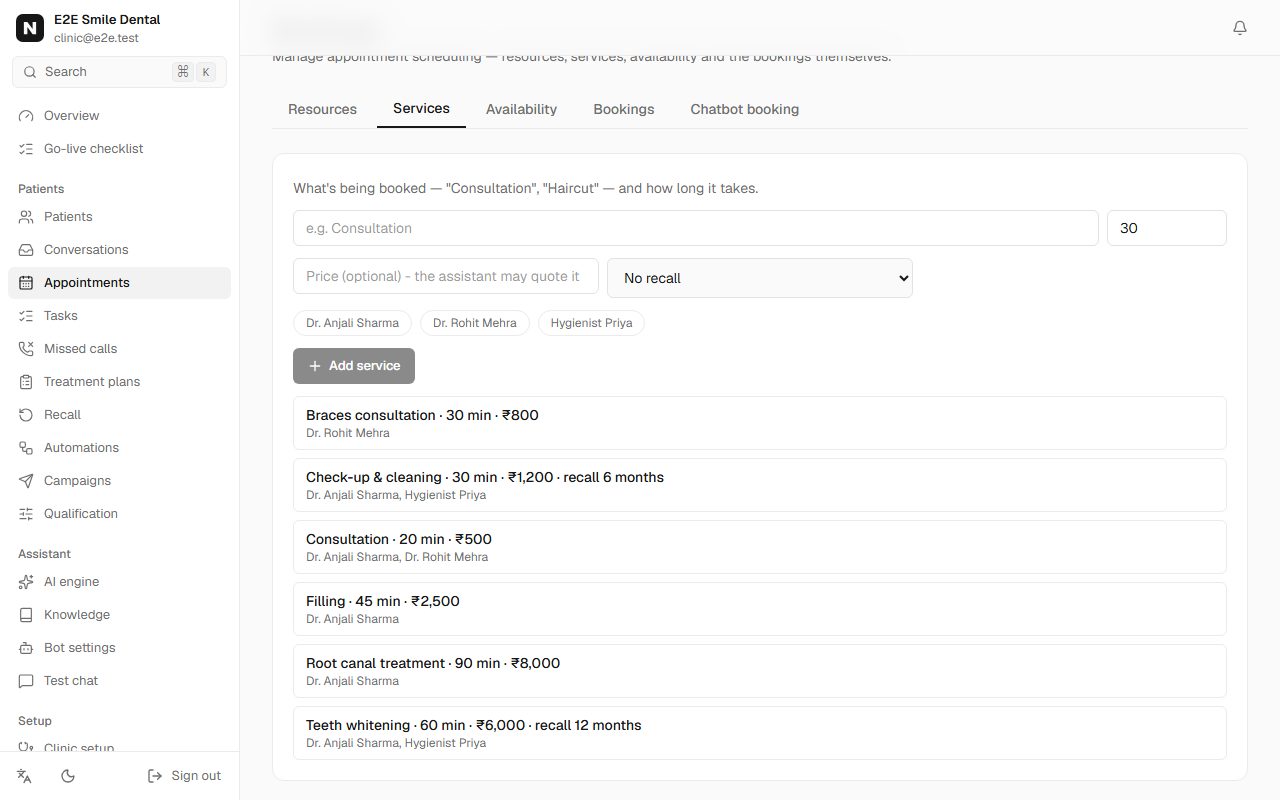
Services list with durations, rupee prices, doctors and recall intervals of 6 and 12 months You should see: The checklist ticks doctors, hours and services.
-
Step 4: Reminders and templates
Pick reminder times on Booking page & rules and create the ready-made templates in Automations (reminder, earlier-slot offer, patient form link, follow-up). See the reminders guide for details.
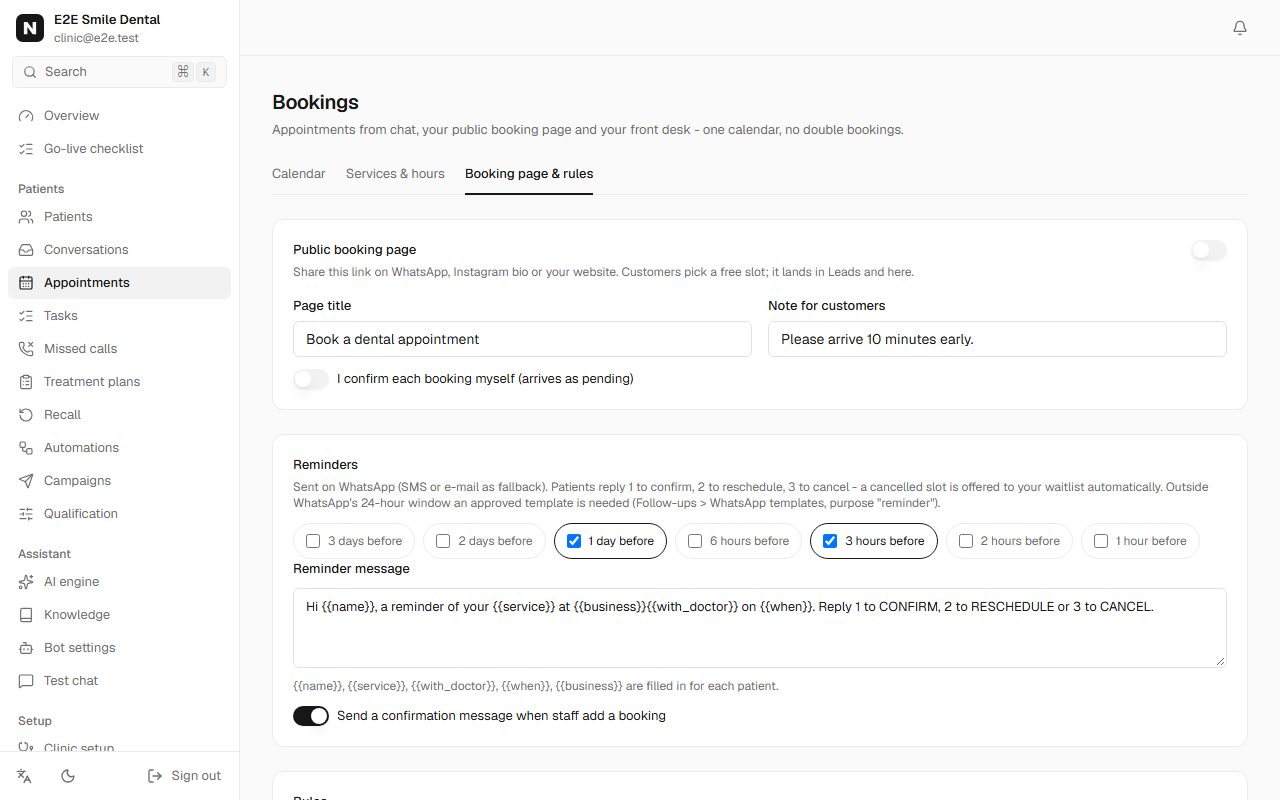
Reminder times 1 day and 3 hours before, with the reminder message -
Step 5: What a WhatsApp booking looks like
This is how the booking runs: the patient taps instead of typing (typing still works, in English, Hindi or Punjabi, and so do voice notes). The slot is held only after they confirm, and two patients can never get the same slot. "Someone else" books for a family member.
Patient books on WhatsApp
- Hi, I want to book a cleaning
- Have you visited Smile Dental Studio before?
- No, I'm new
- Who would you like to see?
- Any available doctor
- Great — what date works for you?
- Tomorrow, Thu 8 Oct
- Here's what's open on Tomorrow, Thu 8 Oct:
- 10:00
- Confirm: Check-up & cleaning with Dr. Anjali Sharma for Asha Verma on Tomorrow, Thu 8 Oct at 10:00?
- Confirm
- You're booked — Check-up & cleaning with Dr. Anjali Sharma on Tomorrow, Thu 8 Oct at 10:00. We'll send a reminder before your appointment.
Patient books on WhatsApp: Customer: Hi, I want to book a cleaning / Smile Dental Studio: Have you visited Smile Dental Studio before? / Customer: No, I'm new / Smile Dental Studio: Who would you like to see? / Customer: Any available doctor / Smile Dental Studio: Great — what date works for you? / Customer: Tomorrow, Thu 8 Oct / Smile Dental Studio: Here's what's open on Tomorrow, Thu 8 Oct: / Customer: 10:00 / Smile Dental Studio: Confirm: Check-up & cleaning with Dr. Anjali Sharma for Asha Verma on Tomorrow, Thu 8 Oct at 10:00? / Customer: Confirm / Smile Dental Studio: You're booked — Check-up & cleaning with Dr. Anjali Sharma on Tomorrow, Thu 8 Oct at 10:00. We'll send a reminder before your appointment. You should see: The appointment appears in Appointments with source WhatsApp, and the patient in Patients.
-
-
Step 6: New-patient form on the phone
New patients receive a link to a short form (details, medical history, consent) right after booking. Answers are saved as they type and appear on the patient's record before the visit.
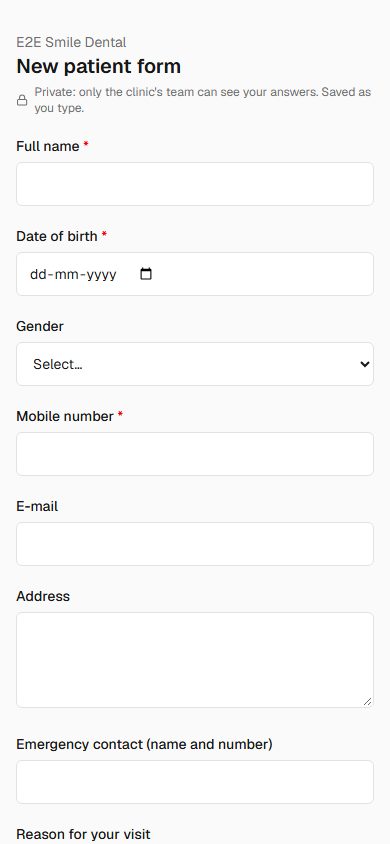
New patient form on a phone with name, date of birth, gender, mobile and address fields -
Step 7: Patients, appointments and the day's work
Patients lists everyone with their next visit, recall due date and open treatment. Click a patient to see appointments, forms, messages and plans. Appointments is the calendar; Tasks collects what staff must do (call back, confirm, review a form).
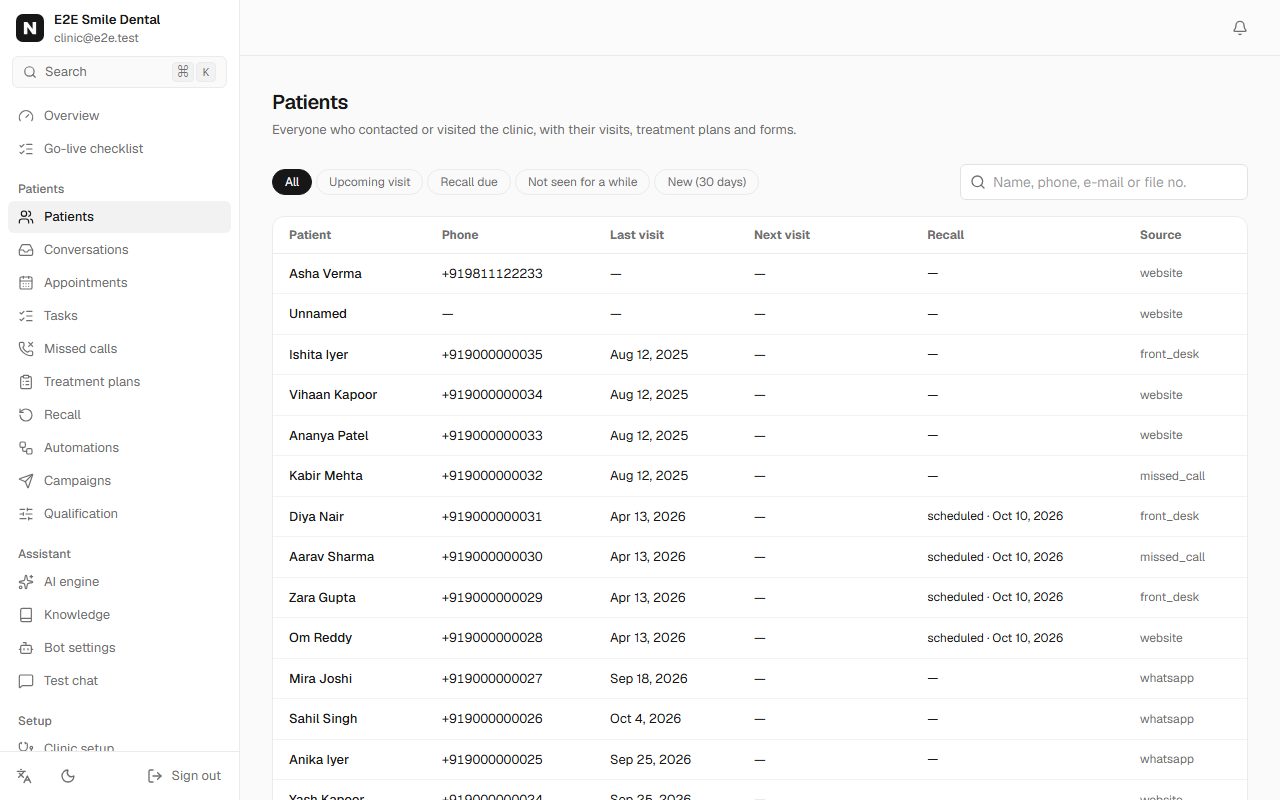
Patients list with views for due recall and open treatment -
Step 8: Recall, treatment plans and the waitlist
Recall shows who is due and who was invited. Treatment plans tracks recommended treatment that isn't booked yet and follows up politely. When an appointment is cancelled, the slot is offered automatically to the best-matching patient on the waitlist; if they don't reply YES in time, it moves on to the next.
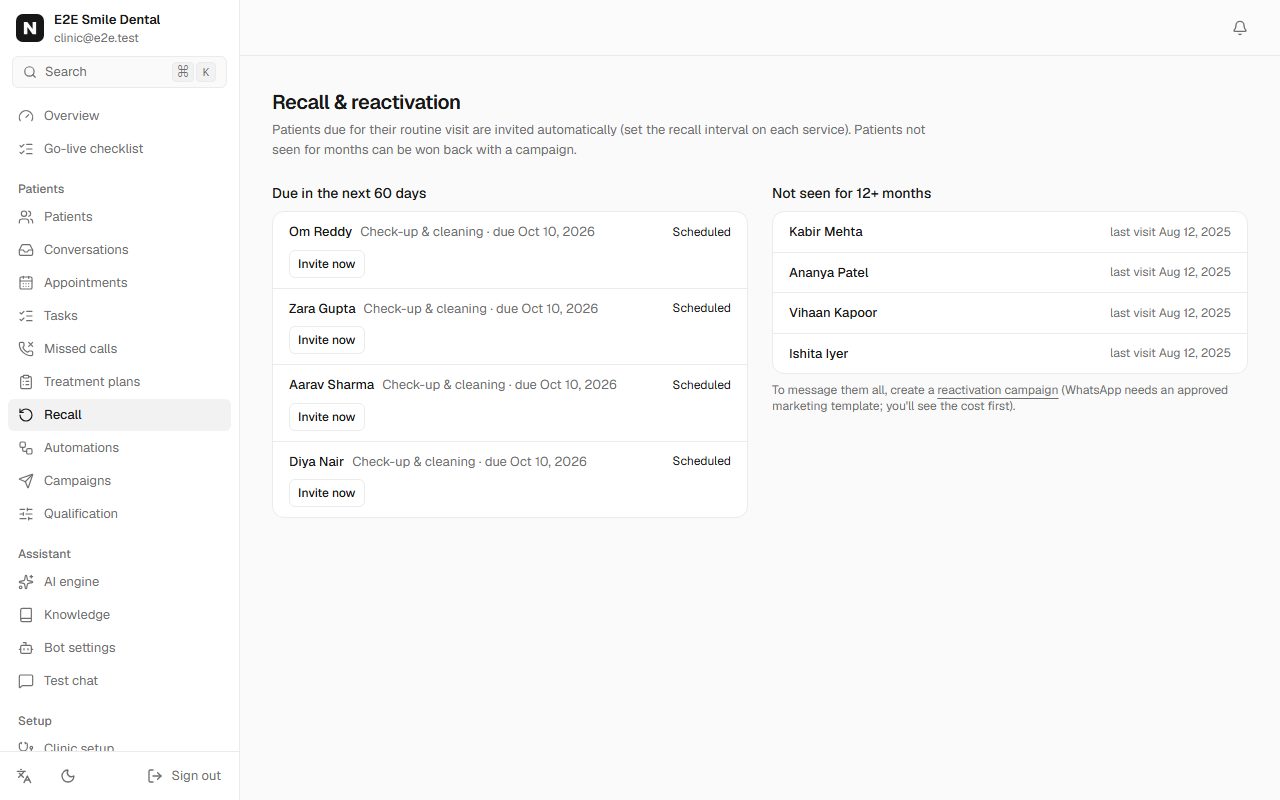
Recall list with patients due and invitations sent -
Step 9: Advance fee, reports and the waiting line (optional)
Three things the front desk answers all day, handled in the chat:
- Advance fee: Appointments > Booking page & rules > Advance fee. With your own Razorpay keys, the booking confirmation includes a UPI/card link; paid links are marked collected on the appointment.
- Reports: on the patient's record, Reports > Upload. When they ask "report bhej do" on WhatsApp, it's sent after they type their date of birth (it must match the record; 3 wrong tries go to your team).
- Waiting line: tap Check in on today's appointment to give a token. "Kitna time lagega?" gets their token, how many are ahead and a rough wait.
-
Step 10: Read the dashboard honestly
Overview counts only what really happened: missed calls answered, appointments booked by the assistant, cancelled slots refilled, recall and reactivation bookings. The money figure is an estimate from your own price list and is labelled as such; Collected is only what staff recorded at check-out.
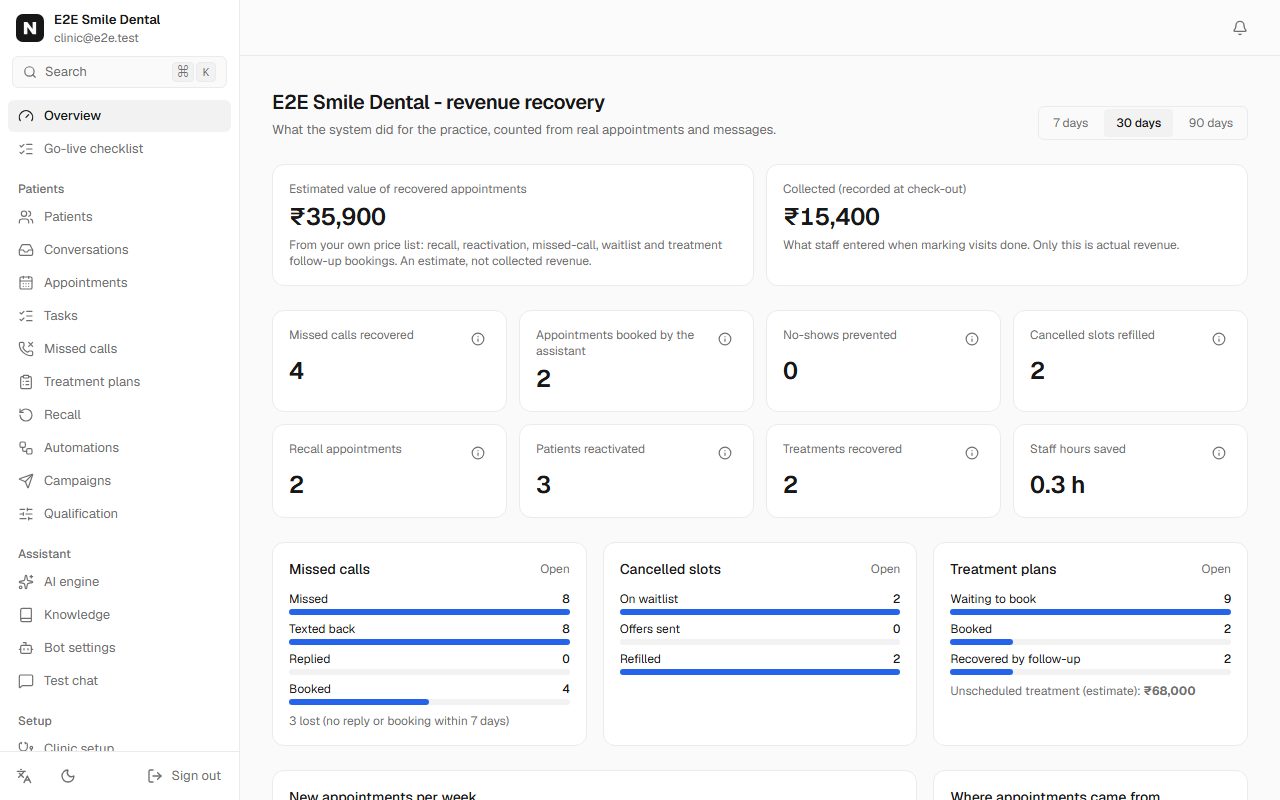
Clinic dashboard with estimated recovered value in rupees, collected amount and counts of recovered appointments
Frequently asked questions
Is this a medical records system?
No. Nomisly handles enquiries, booking, reminders, forms and follow-up. Clinical notes and prescriptions stay in your practice software.
Does the assistant give medical advice?
Never. Medical questions are handed to your team with the reply you set in Clinic setup; emergencies get your emergency-number reply first.
Does it work for hospitals with departments?
Yes. Add departments in Clinic setup; the booking chat asks for the department, then shows only its doctors and services.
Can patients cancel or reschedule themselves?
Yes, by replying to the reminder (2 to reschedule, 3 to cancel) or by asking in the chat.